> ## Documentation Index
> Fetch the complete documentation index at: https://docs.reclaimtime.com/llms.txt
> Use this file to discover all available pages before exploring further.
# Activity
> One row per person showing first and last activity in a period, and what to do with the gaps.
**Activity** is the coverage page. Where Statistics tells you how time was spent, Activity tells you whether the data arrived at all.
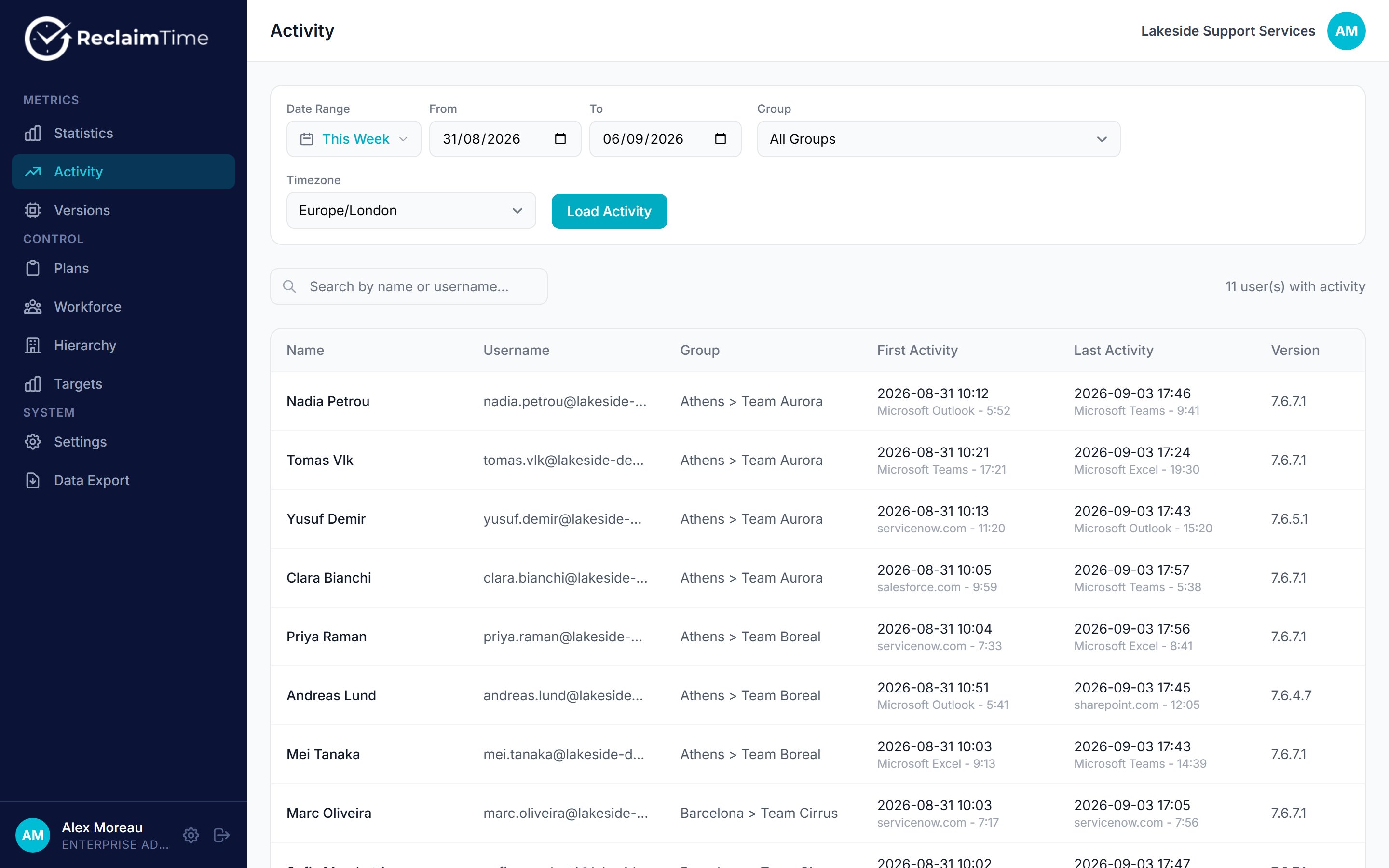 Pick a date range and a group, then click **Load Activity**. The list can take a few seconds because it reads the raw rows rather than a summary.
| Column | Meaning |
| ---------------------- | ----------------------------------------------------------------- |
| **Name**, **Username** | The person |
| **Group** | Their group at the time the rows were written |
| **First Activity** | The earliest row in the period, with the application and the time |
| **Last Activity** | The latest row in the period, with the application and the time |
| **Version** | The client version on those rows |
The count at the top right reads "N user(s) with activity". Compare it with your headcount. **Anyone missing from this list sent nothing at all in the period.**
## What the gaps mean
| What you see | Usually means |
| ------------------------------------------ | -------------------------------------------------------------------- |
| Person missing entirely | Not at work, machine replaced, or the client cannot sign in |
| First activity much later than shift start | Late start, or a machine that took a while to come up |
| Last activity much earlier than shift end | Finished early, or the machine slept or was locked |
| Version much older than the fleet | Machine has not updated. Cross-check on [Versions](/admin/versions). |
Recording is bounded by the working schedule on the person's account and on the organisation. If someone's first activity is always exactly the schedule start, that is the schedule, not their behaviour. If a shift worker shows nothing, check their schedule before anything else. See [Settings](/admin/settings).
Nothing here is real time. The client uploads a session about a minute after it starts and refreshes it every couple of minutes, and the dashboard hides rows less than 15 minutes old. Treat the last 20 minutes of the day as not yet arrived.
## Activity Review
There is a second view at **Activity Review** for inspecting individual rows rather than per-person summaries. It exists for diagnosing data problems, such as checking whether a specific session was recorded, or filtering by client version when a particular build is suspected of producing bad rows.
It is a diagnostic tool, not a reporting one. If you are trying to answer a question about how time was spent, Statistics is the page you want.
## Related tasks
* [Troubleshooting](/guides/troubleshooting)
***
*Checked against ReclaimTime client 8.0.0.9 and dashboard V3 on 5 September 2026.*
Pick a date range and a group, then click **Load Activity**. The list can take a few seconds because it reads the raw rows rather than a summary.
| Column | Meaning |
| ---------------------- | ----------------------------------------------------------------- |
| **Name**, **Username** | The person |
| **Group** | Their group at the time the rows were written |
| **First Activity** | The earliest row in the period, with the application and the time |
| **Last Activity** | The latest row in the period, with the application and the time |
| **Version** | The client version on those rows |
The count at the top right reads "N user(s) with activity". Compare it with your headcount. **Anyone missing from this list sent nothing at all in the period.**
## What the gaps mean
| What you see | Usually means |
| ------------------------------------------ | -------------------------------------------------------------------- |
| Person missing entirely | Not at work, machine replaced, or the client cannot sign in |
| First activity much later than shift start | Late start, or a machine that took a while to come up |
| Last activity much earlier than shift end | Finished early, or the machine slept or was locked |
| Version much older than the fleet | Machine has not updated. Cross-check on [Versions](/admin/versions). |
Recording is bounded by the working schedule on the person's account and on the organisation. If someone's first activity is always exactly the schedule start, that is the schedule, not their behaviour. If a shift worker shows nothing, check their schedule before anything else. See [Settings](/admin/settings).
Nothing here is real time. The client uploads a session about a minute after it starts and refreshes it every couple of minutes, and the dashboard hides rows less than 15 minutes old. Treat the last 20 minutes of the day as not yet arrived.
## Activity Review
There is a second view at **Activity Review** for inspecting individual rows rather than per-person summaries. It exists for diagnosing data problems, such as checking whether a specific session was recorded, or filtering by client version when a particular build is suspected of producing bad rows.
It is a diagnostic tool, not a reporting one. If you are trying to answer a question about how time was spent, Statistics is the page you want.
## Related tasks
* [Troubleshooting](/guides/troubleshooting)
***
*Checked against ReclaimTime client 8.0.0.9 and dashboard V3 on 5 September 2026.*