> ## Documentation Index
> Fetch the complete documentation index at: https://docs.reclaimtime.com/llms.txt
> Use this file to discover all available pages before exploring further.
# Data export
> Exporting raw or daily activity for a date range, what the columns contain, and why the download streams a day at a time.
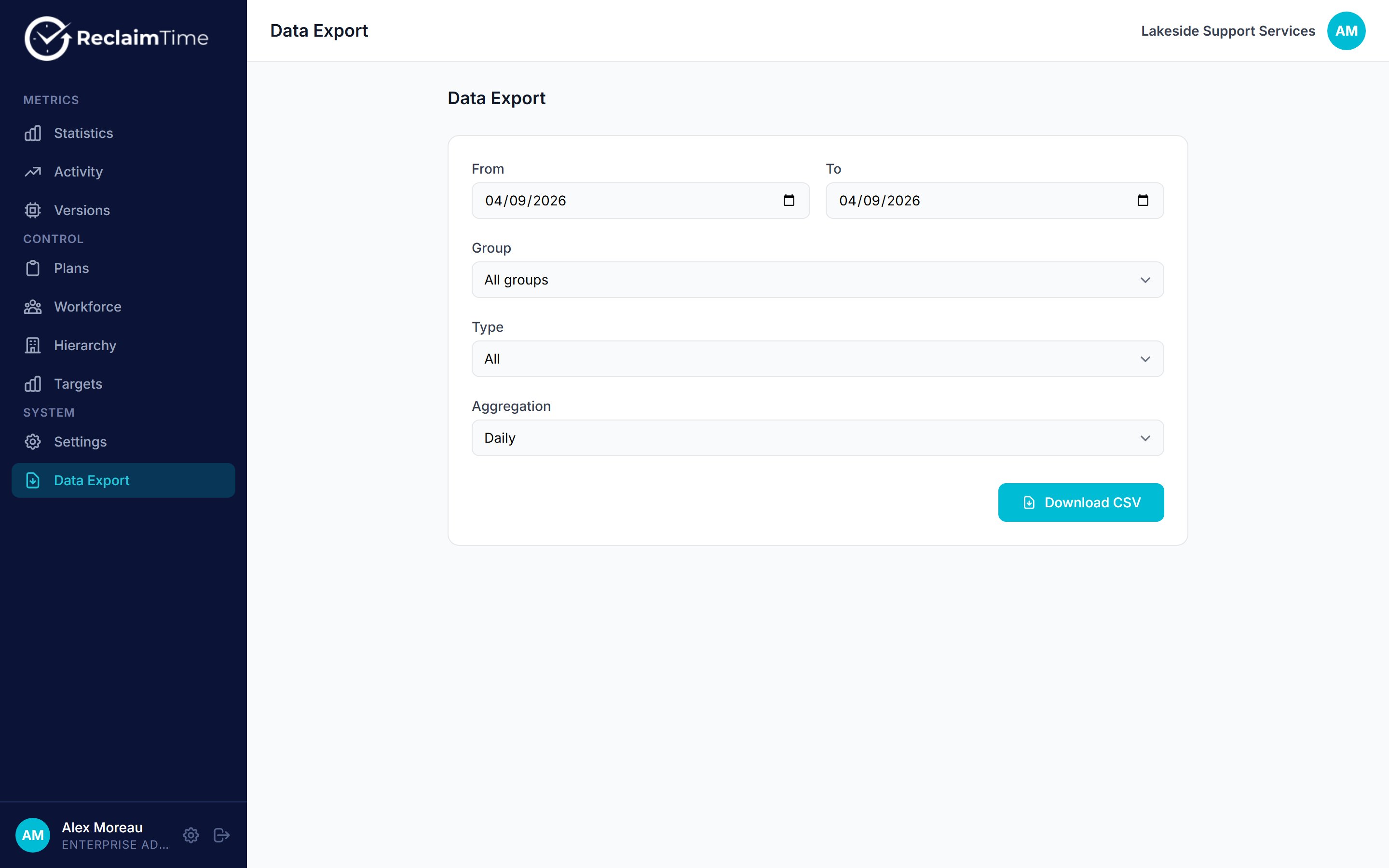
**Data Export** produces a CSV of activity for a date range. Use it when you need the underlying rows for your own analysis, rather than the summaries on Statistics.
 ## Options
| Option | Choices |
| ---------------- | -------------------------------------------------------------------------------------------------------------- |
| **From**, **To** | The date range. Any length. |
| **Group** | One group and everything beneath it, or all groups. |
| **Type** | Everything, applications only, or websites only. |
| **Aggregation** | **Daily**, one row per person per application or site per day, or **None (raw records)**, one row per session. |
Click **Download CSV**. The browser assembles the file day by day and saves it when the range is complete, so a long range takes a while and the button stays busy until it finishes. That is deliberate: it is what lets a year of data export without the request timing out, which is how the old dashboard used to fail.
Leave the tab open and the machine awake until the download completes. The file is built in the browser, so navigating away part way through loses the work and you start again.
## Columns
Daily aggregation gives you:
| Column | Contains |
| ----------- | ------------------------------------------------------------ |
| `startedOn` | The day, as `YYYY-MM-DD` |
| `username` | The person |
| `email` | Their email address |
| `group` | Their group |
| `app_name` | The application |
| `website` | The site, for browser activity |
| `duration` | Total focused seconds for that person, that target, that day |
Raw records give one row per session with the session's own start time, including the UTC offset, so a raw export can be re-bucketed into any timezone afterwards.
Rows with no username are the anonymised, non-corporate ones. They still carry a group, so they aggregate correctly at team level. Do not filter them out without understanding that you are removing real recorded time. See [Corporate and non-corporate targets](/concepts/corporate-targets).
## Choosing an aggregation
* **Daily** is what you want for reporting: a manageable file, and one row per person per target per day is the natural grain for a pivot table.
* **None** is for investigation: when you need to see the individual sessions, for example to check whether a long block of time was one session or many.
Raw exports get large quickly. A single person generates on the order of a hundred rows a day, so a month for a few hundred people is a file worth thinking about before you open it in a spreadsheet.
## What is not here yet
There is no scheduled export and no emailed report. Every export is something a person starts and waits for. Scheduled exports with a download link are planned but not shipped, and this page will be updated when they are.
***
*Checked against ReclaimTime client 8.0.0.9 and dashboard V3 on 5 September 2026.*
## Options
| Option | Choices |
| ---------------- | -------------------------------------------------------------------------------------------------------------- |
| **From**, **To** | The date range. Any length. |
| **Group** | One group and everything beneath it, or all groups. |
| **Type** | Everything, applications only, or websites only. |
| **Aggregation** | **Daily**, one row per person per application or site per day, or **None (raw records)**, one row per session. |
Click **Download CSV**. The browser assembles the file day by day and saves it when the range is complete, so a long range takes a while and the button stays busy until it finishes. That is deliberate: it is what lets a year of data export without the request timing out, which is how the old dashboard used to fail.
Leave the tab open and the machine awake until the download completes. The file is built in the browser, so navigating away part way through loses the work and you start again.
## Columns
Daily aggregation gives you:
| Column | Contains |
| ----------- | ------------------------------------------------------------ |
| `startedOn` | The day, as `YYYY-MM-DD` |
| `username` | The person |
| `email` | Their email address |
| `group` | Their group |
| `app_name` | The application |
| `website` | The site, for browser activity |
| `duration` | Total focused seconds for that person, that target, that day |
Raw records give one row per session with the session's own start time, including the UTC offset, so a raw export can be re-bucketed into any timezone afterwards.
Rows with no username are the anonymised, non-corporate ones. They still carry a group, so they aggregate correctly at team level. Do not filter them out without understanding that you are removing real recorded time. See [Corporate and non-corporate targets](/concepts/corporate-targets).
## Choosing an aggregation
* **Daily** is what you want for reporting: a manageable file, and one row per person per target per day is the natural grain for a pivot table.
* **None** is for investigation: when you need to see the individual sessions, for example to check whether a long block of time was one session or many.
Raw exports get large quickly. A single person generates on the order of a hundred rows a day, so a month for a few hundred people is a file worth thinking about before you open it in a spreadsheet.
## What is not here yet
There is no scheduled export and no emailed report. Every export is something a person starts and waits for. Scheduled exports with a download link are planned but not shipped, and this page will be updated when they are.
***
*Checked against ReclaimTime client 8.0.0.9 and dashboard V3 on 5 September 2026.*