> ## Documentation Index
> Fetch the complete documentation index at: https://docs.reclaimtime.com/llms.txt
> Use this file to discover all available pages before exploring further.
# Settings
> Organisation defaults for timezone and working hours, the version thresholds that drive the Versions page, the download URL and the three update email templates.
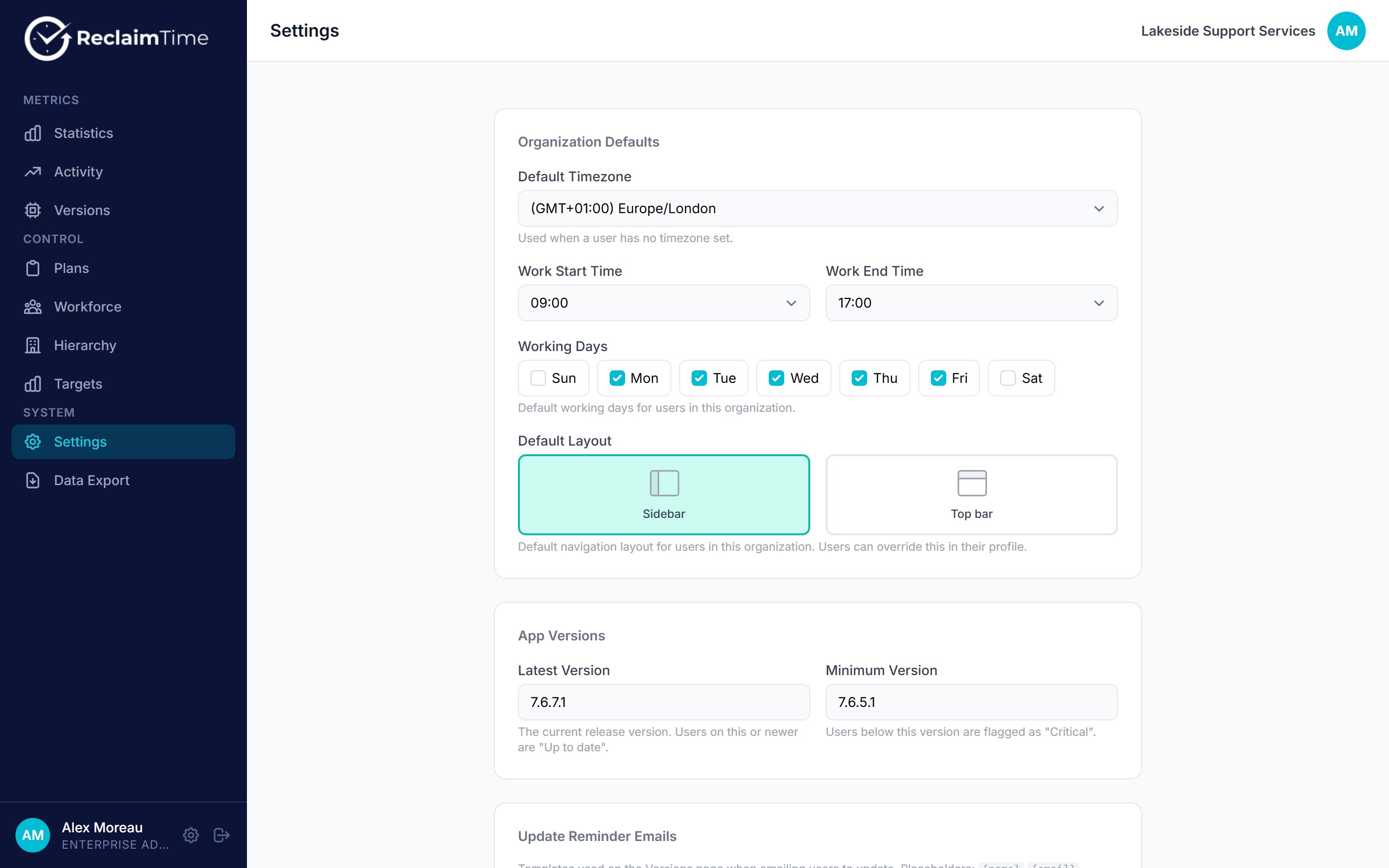
**Settings** holds the organisation-wide defaults. Everything on this page applies to the whole organisation, and some of it is inherited by every new user.
 ## Defaults
| Setting | What it does |
| ----------------- | ----------------------------------------------------------------------------------------------------------------------- |
| **Timezone** | The organisation's timezone. Used to turn stored UTC times into local ones on every page and export. |
| **Working days** | Which days count as working days. |
| **Working hours** | The start and end of the working day. |
| **Layout** | Whether the dashboard navigation is a sidebar or a top bar, for everyone who has not chosen their own in their profile. |
Working days and hours are not a display filter. The desktop client records **nothing at all** outside them. Widening the hours does not reveal data that was previously hidden, because it was never recorded, and narrowing them stops recording from that point on. Get these right before a rollout.
The working schedule here is the default for new users. An individual can be given different hours on their own record. See [Accounts](/admin/accounts).
## Version thresholds
Two version numbers drive the whole of the [Versions](/admin/versions) page.
| Setting | Meaning |
| ------------------- | ------------------------------------------------------------------------------------------------------------------------- |
| **Latest Version** | The version you consider current. Anyone at or above it is **Up to date**. |
| **Minimum Version** | The oldest version you are prepared to tolerate. Anyone below it is **Critical**. Anyone between the two is **Outdated**. |
Set **Latest Version** to the version you have actually published to your update channel, not the newest that exists anywhere. If you set it higher than what your machines can reach, every machine reports Outdated forever and the page stops being useful.
## Download URL
The address that goes into the update emails in place of `{download_url}`. Point it at wherever your organisation expects people to get the installer: our download page, or your own software portal.
## Email templates
Three templates, used by the mail button on each row of the Versions page. The button opens a pre-filled draft in your own mail client, so nothing is sent by ReclaimTime and nothing leaves the dashboard.
| Template | Used for |
| -------------- | -------------------------------------------------------------- |
| **Update** | Someone whose version is **Outdated** |
| **Critical** | Someone below the minimum version |
| **Never seen** | Someone who has never reported, so probably never installed it |
Each has a subject and a body, and both accept these placeholders:
| Placeholder | Replaced with |
| ------------------- | ----------------------------------------------------------------------- |
| `{name}` | The person's name |
| `{email}` | Their email address |
| `{username}` | Their username |
| `{version}` | The version they are running, or `unknown` |
| `{latest_version}` | The organisation's Latest Version |
| `{minimum_version}` | The organisation's Minimum Version |
| `{download_url}` | The download URL above |
| `{admin_name}` | The name on your own account, so the mail is signed by whoever sends it |
Placeholders that have no value are replaced with an empty string, so a template that uses `{minimum_version}` will read oddly if you have not set one. Fill in both version numbers before relying on the templates.
Write the templates once, in your organisation's own tone and language. They are sent from a person's own mailbox, so they should read like a message from a colleague rather than from a tool.
## Related tasks
* [Chase machines on old versions](/guides/chase-old-versions)
***
*Checked against ReclaimTime client 8.0.0.9 and dashboard V3 on 5 September 2026.*
## Defaults
| Setting | What it does |
| ----------------- | ----------------------------------------------------------------------------------------------------------------------- |
| **Timezone** | The organisation's timezone. Used to turn stored UTC times into local ones on every page and export. |
| **Working days** | Which days count as working days. |
| **Working hours** | The start and end of the working day. |
| **Layout** | Whether the dashboard navigation is a sidebar or a top bar, for everyone who has not chosen their own in their profile. |
Working days and hours are not a display filter. The desktop client records **nothing at all** outside them. Widening the hours does not reveal data that was previously hidden, because it was never recorded, and narrowing them stops recording from that point on. Get these right before a rollout.
The working schedule here is the default for new users. An individual can be given different hours on their own record. See [Accounts](/admin/accounts).
## Version thresholds
Two version numbers drive the whole of the [Versions](/admin/versions) page.
| Setting | Meaning |
| ------------------- | ------------------------------------------------------------------------------------------------------------------------- |
| **Latest Version** | The version you consider current. Anyone at or above it is **Up to date**. |
| **Minimum Version** | The oldest version you are prepared to tolerate. Anyone below it is **Critical**. Anyone between the two is **Outdated**. |
Set **Latest Version** to the version you have actually published to your update channel, not the newest that exists anywhere. If you set it higher than what your machines can reach, every machine reports Outdated forever and the page stops being useful.
## Download URL
The address that goes into the update emails in place of `{download_url}`. Point it at wherever your organisation expects people to get the installer: our download page, or your own software portal.
## Email templates
Three templates, used by the mail button on each row of the Versions page. The button opens a pre-filled draft in your own mail client, so nothing is sent by ReclaimTime and nothing leaves the dashboard.
| Template | Used for |
| -------------- | -------------------------------------------------------------- |
| **Update** | Someone whose version is **Outdated** |
| **Critical** | Someone below the minimum version |
| **Never seen** | Someone who has never reported, so probably never installed it |
Each has a subject and a body, and both accept these placeholders:
| Placeholder | Replaced with |
| ------------------- | ----------------------------------------------------------------------- |
| `{name}` | The person's name |
| `{email}` | Their email address |
| `{username}` | Their username |
| `{version}` | The version they are running, or `unknown` |
| `{latest_version}` | The organisation's Latest Version |
| `{minimum_version}` | The organisation's Minimum Version |
| `{download_url}` | The download URL above |
| `{admin_name}` | The name on your own account, so the mail is signed by whoever sends it |
Placeholders that have no value are replaced with an empty string, so a template that uses `{minimum_version}` will read oddly if you have not set one. Fill in both version numbers before relying on the templates.
Write the templates once, in your organisation's own tone and language. They are sent from a person's own mailbox, so they should read like a message from a colleague rather than from a tool.
## Related tasks
* [Chase machines on old versions](/guides/chase-old-versions)
***
*Checked against ReclaimTime client 8.0.0.9 and dashboard V3 on 5 September 2026.*