> ## Documentation Index
> Fetch the complete documentation index at: https://docs.reclaimtime.com/llms.txt
> Use this file to discover all available pages before exploring further.
# Versions
> Who is on which client version, what each status means, filtering and CSV, and the update emails you can send from the page.
**Versions** answers two questions at once: which client version is each person running, and when did each machine last report. It is the page to open when somebody says the fleet is out of date, and the page to export when somebody asks who is actually using ReclaimTime.
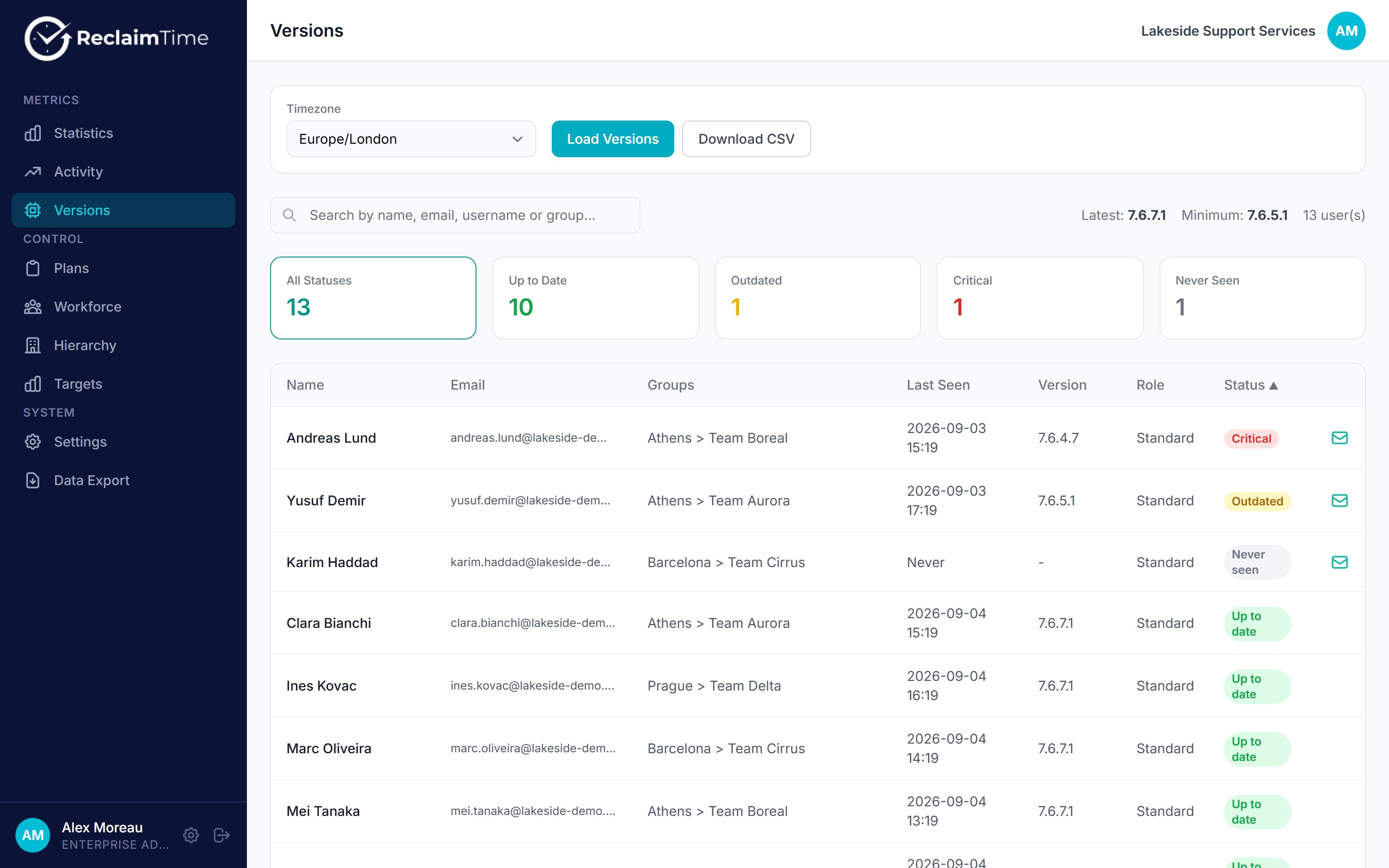 The page loads when you open it. **Load Versions** reloads it. It reads each person's most recent sign-in, and falls back to their most recent activity when a sign-in did not report a version.
Only standard users are listed. Supervisors and admins are not tracked, so they have no client version to report.
## Statuses
Every standard user gets one of four statuses, from the two version numbers in [Settings](/admin/settings).
| Status | Rule |
| -------------- | --------------------------------------------------------- |
| **Up to date** | At or above **Latest Version** |
| **Outdated** | Below **Latest Version**, at or above **Minimum Version** |
| **Critical** | Below **Minimum Version** |
| **Never seen** | No sign-in and no activity has ever been recorded |
The four cards at the top count each status. Click one to filter the table to it, and click it again to clear. The list is sorted with the most urgent first: Critical, then Outdated, then Never seen, then Up to date, so the top of the page is always the work.
Search matches name, email, username and group.
**Never seen** is not the same as **Critical**. Critical means an old client is running and reporting. Never seen means nothing has ever arrived, so the usual causes are that the client was never installed or that it has never managed to sign in. Check [First login and SSO](/first-login) before assuming an installation problem.
## Version unknown
A version shown as a dash means a sign-in was recorded without a version. That happens when the sign-in came from the dashboard rather than the desktop client, and it is normal for supervisors and admins. For a standard user the page falls back to the version on their activity rows, so a dash there means neither source has one.
## Download CSV
**Download CSV** exports the list as shown, with name, email, groups, last seen, version and status. This is the fastest way to answer questions the dashboard has no page for. Sort the CSV by last seen and you have your active users, your silent accounts and your leavers in one file.
## Emailing people to update
Each row has a mail button. It opens a draft in your own mail client, pre-filled from the template that matches the person's status, with their name, version and your download link already in it. Review it and send.
Nothing is sent by ReclaimTime. There is no mail queue, no bulk send and no record in the dashboard of what went out, so the sending, and any follow-up, is yours to track. The three templates and their placeholders are in [Settings](/admin/settings).
## Reading the page honestly
* A whole group stuck on one old version usually means nothing has been published to your update channel, not that the machines are broken. See [Updates](/updates).
* Scattered old versions usually mean machines that are off, rebuilt or belong to leavers. Cross-check against the last seen date before chasing anyone.
* Somebody who left months ago will sit here forever as an old version with a stale date. Deleting the account is what removes them, not uninstalling the client.
## Related tasks
* [Chase machines on old versions](/guides/chase-old-versions)
* [Someone has left](/guides/someone-has-left)
***
*Checked against ReclaimTime client 8.0.0.9 and dashboard V3 on 5 September 2026.*
The page loads when you open it. **Load Versions** reloads it. It reads each person's most recent sign-in, and falls back to their most recent activity when a sign-in did not report a version.
Only standard users are listed. Supervisors and admins are not tracked, so they have no client version to report.
## Statuses
Every standard user gets one of four statuses, from the two version numbers in [Settings](/admin/settings).
| Status | Rule |
| -------------- | --------------------------------------------------------- |
| **Up to date** | At or above **Latest Version** |
| **Outdated** | Below **Latest Version**, at or above **Minimum Version** |
| **Critical** | Below **Minimum Version** |
| **Never seen** | No sign-in and no activity has ever been recorded |
The four cards at the top count each status. Click one to filter the table to it, and click it again to clear. The list is sorted with the most urgent first: Critical, then Outdated, then Never seen, then Up to date, so the top of the page is always the work.
Search matches name, email, username and group.
**Never seen** is not the same as **Critical**. Critical means an old client is running and reporting. Never seen means nothing has ever arrived, so the usual causes are that the client was never installed or that it has never managed to sign in. Check [First login and SSO](/first-login) before assuming an installation problem.
## Version unknown
A version shown as a dash means a sign-in was recorded without a version. That happens when the sign-in came from the dashboard rather than the desktop client, and it is normal for supervisors and admins. For a standard user the page falls back to the version on their activity rows, so a dash there means neither source has one.
## Download CSV
**Download CSV** exports the list as shown, with name, email, groups, last seen, version and status. This is the fastest way to answer questions the dashboard has no page for. Sort the CSV by last seen and you have your active users, your silent accounts and your leavers in one file.
## Emailing people to update
Each row has a mail button. It opens a draft in your own mail client, pre-filled from the template that matches the person's status, with their name, version and your download link already in it. Review it and send.
Nothing is sent by ReclaimTime. There is no mail queue, no bulk send and no record in the dashboard of what went out, so the sending, and any follow-up, is yours to track. The three templates and their placeholders are in [Settings](/admin/settings).
## Reading the page honestly
* A whole group stuck on one old version usually means nothing has been published to your update channel, not that the machines are broken. See [Updates](/updates).
* Scattered old versions usually mean machines that are off, rebuilt or belong to leavers. Cross-check against the last seen date before chasing anyone.
* Somebody who left months ago will sit here forever as an old version with a stale date. Deleting the account is what removes them, not uninstalling the client.
## Related tasks
* [Chase machines on old versions](/guides/chase-old-versions)
* [Someone has left](/guides/someone-has-left)
***
*Checked against ReclaimTime client 8.0.0.9 and dashboard V3 on 5 September 2026.*